

Note
Go to the end to download the full example code.
Model interpretability with TabICL#
TabICL comes with a fast approximations of SHAP values. It is much faster than using black-box shape routines on TabICL which is slow.
Here we demo it on dataset on wages
The dataset: wages#
from sklearn.datasets import fetch_openml

survey = fetch_openml(data_id=534, as_frame=True)

X = survey.data[survey.feature_names]
A quick glance at the data with skrub’s TableReport
import skrub

skrub.TableReport(X)
| EDUCATION | SOUTH | SEX | EXPERIENCE | UNION | AGE | RACE | OCCUPATION | SECTOR | MARR | |
|---|---|---|---|---|---|---|---|---|---|---|
| 0 | 8 | no | female | 21 | not_member | 35 | Hispanic | Other | Manufacturing | Married |
| 1 | 9 | no | female | 42 | not_member | 57 | White | Other | Manufacturing | Married |
| 2 | 12 | no | male | 1 | not_member | 19 | White | Other | Manufacturing | Unmarried |
| 3 | 12 | no | male | 4 | not_member | 22 | White | Other | Other | Unmarried |
| 4 | 12 | no | male | 17 | not_member | 35 | White | Other | Other | Married |
| 529 | 18 | no | male | 5 | not_member | 29 | White | Professional | Other | Unmarried |
| 530 | 12 | no | female | 33 | not_member | 51 | Other | Professional | Other | Married |
| 531 | 17 | no | female | 25 | member | 48 | Other | Professional | Other | Married |
| 532 | 12 | yes | male | 13 | member | 31 | White | Professional | Other | Married |
| 533 | 16 | no | male | 33 | not_member | 55 | White | Professional | Manufacturing | Married |
EDUCATION
Int64DType- Null values
- 0 (0.0%)
- Unique values
- 17 (3.2%)
- Mean ± Std
- 13.0 ± 2.62
- Median ± IQR
- 12 ± 3
- Min | Max
- 2 | 18
SOUTH
CategoricalDtype- Null values
- 0 (0.0%)
- Unique values
- 2 (0.4%)
Most frequent values
SEX
CategoricalDtype- Null values
- 0 (0.0%)
- Unique values
- 2 (0.4%)
Most frequent values
EXPERIENCE
Int64DType- Null values
- 0 (0.0%)
- Unique values
-
52 (9.7%)
This column has a high cardinality (> 40).
- Mean ± Std
- 17.8 ± 12.4
- Median ± IQR
- 15 ± 18
- Min | Max
- 0 | 55
UNION
CategoricalDtype- Null values
- 0 (0.0%)
- Unique values
- 2 (0.4%)
Most frequent values
AGE
Int64DType- Null values
- 0 (0.0%)
- Unique values
-
47 (8.8%)
This column has a high cardinality (> 40).
- Mean ± Std
- 36.8 ± 11.7
- Median ± IQR
- 35 ± 16
- Min | Max
- 18 | 64
RACE
CategoricalDtype- Null values
- 0 (0.0%)
- Unique values
- 3 (0.6%)
Most frequent values
OCCUPATION
CategoricalDtype- Null values
- 0 (0.0%)
- Unique values
- 6 (1.1%)
Most frequent values
SECTOR
CategoricalDtype- Null values
- 0 (0.0%)
- Unique values
- 3 (0.6%)
Most frequent values
MARR
CategoricalDtype- Null values
- 0 (0.0%)
- Unique values
- 2 (0.4%)
Most frequent values
No columns match the selected filter: . You can change the column filter in the dropdown menu above.
| Column | Column name | dtype | Is sorted | Null values | Unique values | Mean | Std | Min | Median | Max |
|---|---|---|---|---|---|---|---|---|---|---|
| 0 | EDUCATION | Int64DType | False | 0 (0.0%) | 17 (3.2%) | 13.0 | 2.62 | 2 | 12 | 18 |
| 1 | SOUTH | CategoricalDtype | False | 0 (0.0%) | 2 (0.4%) | |||||
| 2 | SEX | CategoricalDtype | False | 0 (0.0%) | 2 (0.4%) | |||||
| 3 | EXPERIENCE | Int64DType | False | 0 (0.0%) | 52 (9.7%) | 17.8 | 12.4 | 0 | 15 | 55 |
| 4 | UNION | CategoricalDtype | False | 0 (0.0%) | 2 (0.4%) | |||||
| 5 | AGE | Int64DType | False | 0 (0.0%) | 47 (8.8%) | 36.8 | 11.7 | 18 | 35 | 64 |
| 6 | RACE | CategoricalDtype | False | 0 (0.0%) | 3 (0.6%) | |||||
| 7 | OCCUPATION | CategoricalDtype | False | 0 (0.0%) | 6 (1.1%) | |||||
| 8 | SECTOR | CategoricalDtype | False | 0 (0.0%) | 3 (0.6%) | |||||
| 9 | MARR | CategoricalDtype | False | 0 (0.0%) | 2 (0.4%) |
No columns match the selected filter: . You can change the column filter in the dropdown menu above.
EDUCATION
Int64DType- Null values
- 0 (0.0%)
- Unique values
- 17 (3.2%)
- Mean ± Std
- 13.0 ± 2.62
- Median ± IQR
- 12 ± 3
- Min | Max
- 2 | 18
SOUTH
CategoricalDtype- Null values
- 0 (0.0%)
- Unique values
- 2 (0.4%)
Most frequent values
SEX
CategoricalDtype- Null values
- 0 (0.0%)
- Unique values
- 2 (0.4%)
Most frequent values
EXPERIENCE
Int64DType- Null values
- 0 (0.0%)
- Unique values
-
52 (9.7%)
This column has a high cardinality (> 40).
- Mean ± Std
- 17.8 ± 12.4
- Median ± IQR
- 15 ± 18
- Min | Max
- 0 | 55
UNION
CategoricalDtype- Null values
- 0 (0.0%)
- Unique values
- 2 (0.4%)
Most frequent values
AGE
Int64DType- Null values
- 0 (0.0%)
- Unique values
-
47 (8.8%)
This column has a high cardinality (> 40).
- Mean ± Std
- 36.8 ± 11.7
- Median ± IQR
- 35 ± 16
- Min | Max
- 18 | 64
RACE
CategoricalDtype- Null values
- 0 (0.0%)
- Unique values
- 3 (0.6%)
Most frequent values
OCCUPATION
CategoricalDtype- Null values
- 0 (0.0%)
- Unique values
- 6 (1.1%)
Most frequent values
SECTOR
CategoricalDtype- Null values
- 0 (0.0%)
- Unique values
- 3 (0.6%)
Most frequent values
MARR
CategoricalDtype- Null values
- 0 (0.0%)
- Unique values
- 2 (0.4%)
Most frequent values
No columns match the selected filter: . You can change the column filter in the dropdown menu above.
| Column 1 | Column 2 | Cramér's V | Pearson's Correlation |
|---|---|---|---|
| EXPERIENCE | AGE | 0.637 | 0.978 |
| SEX | OCCUPATION | 0.418 | |
| OCCUPATION | SECTOR | 0.368 | |
| EXPERIENCE | MARR | 0.359 | |
| AGE | MARR | 0.352 | |
| EDUCATION | OCCUPATION | 0.319 | |
| UNION | OCCUPATION | 0.240 | |
| EDUCATION | EXPERIENCE | 0.199 | -0.353 |
| EDUCATION | SECTOR | 0.191 | |
| SEX | SECTOR | 0.182 | |
| EDUCATION | AGE | 0.180 | -0.150 |
| SOUTH | EXPERIENCE | 0.170 | |
| EDUCATION | RACE | 0.167 | |
| EDUCATION | SOUTH | 0.165 | |
| SEX | UNION | 0.157 | |
| EXPERIENCE | UNION | 0.156 | |
| SOUTH | AGE | 0.155 | |
| EXPERIENCE | RACE | 0.154 | |
| EDUCATION | SEX | 0.148 | |
| EXPERIENCE | SECTOR | 0.146 | |
| AGE | OCCUPATION | 0.141 | |
| EXPERIENCE | OCCUPATION | 0.141 | |
| EDUCATION | MARR | 0.137 | |
| UNION | AGE | 0.136 | |
| AGE | RACE | 0.135 | |
| AGE | SECTOR | 0.135 | |
| SEX | EXPERIENCE | 0.134 | |
| SEX | AGE | 0.134 | |
| SOUTH | RACE | 0.126 | |
| SOUTH | OCCUPATION | 0.118 | |
| OCCUPATION | MARR | 0.111 | |
| RACE | OCCUPATION | 0.105 | |
| UNION | SECTOR | 0.0998 | |
| EDUCATION | UNION | 0.0957 | |
| UNION | MARR | 0.0932 | |
| UNION | RACE | 0.0884 | |
| SOUTH | UNION | 0.0863 | |
| SOUTH | SECTOR | 0.0823 | |
| SECTOR | MARR | 0.0564 | |
| RACE | MARR | 0.0483 | |
| RACE | SECTOR | 0.0431 | |
| SEX | RACE | 0.0321 | |
| SOUTH | SEX | 0.0213 | |
| SEX | MARR | 0.0112 | |
| SOUTH | MARR | 0.00652 |
Please enable javascript
The skrub table reports need javascript to display correctly. If you are displaying a report in a Jupyter notebook and you see this message, you may need to re-execute the cell or to trust the notebook (button on the top right or "File > Trust notebook").
We need to convert the categorical features to numeric ones. We can do this with pandas’ get_dummies
import pandas as pd

X = pd.get_dummies(X, drop_first=True)
The values to predict: wages
Split out a test set
from sklearn.model_selection import train_test_split

X_train, X_test, y_train, y_test = train_test_split(X, y)
Our TabICL model#
from tabicl import TabICLRegressor

clf = TabICLRegressor(n_estimators=4, device="cpu")
clf.fit(X_train, y_train)
Checkpoint 'tabicl-regressor-v2-20260212.ckpt' not cached.
 Downloading from Hugging Face Hub (jingang/TabICL).

Warning: You are sending unauthenticated requests to the HF Hub. Please set a HF_TOKEN to enable higher rate limits and faster downloads.
Shap-like interpretability#
Use TabICL’s fast approximations of shap-like values and plot them
This part of the example requires to install the shap extra: pip install ‘tabicl[shap]
from tabicl.shap import get_shap_values, plot_shap

# Compute the shap values
sv = get_shap_values(clf, X_test[:10])
PermutationExplainer explainer:  10%|█         | 1/10 [00:00<?, ?it/s]
PermutationExplainer explainer:  30%|███       | 3/10 [01:38<02:45, 23.64s/it]
PermutationExplainer explainer:  40%|████      | 4/10 [02:25<03:20, 33.44s/it]
PermutationExplainer explainer:  50%|█████     | 5/10 [03:12<03:11, 38.29s/it]
PermutationExplainer explainer:  60%|██████    | 6/10 [03:57<02:43, 40.78s/it]
PermutationExplainer explainer:  70%|███████   | 7/10 [04:42<02:07, 42.34s/it]
PermutationExplainer explainer:  80%|████████  | 8/10 [05:30<01:27, 43.90s/it]
PermutationExplainer explainer:  90%|█████████ | 9/10 [06:17<00:44, 44.95s/it]
PermutationExplainer explainer: 100%|██████████| 10/10 [07:04<00:00, 45.64s/it]
PermutationExplainer explainer: 11it [07:50, 45.67s/it]
PermutationExplainer explainer: 11it [07:50, 47.03s/it]
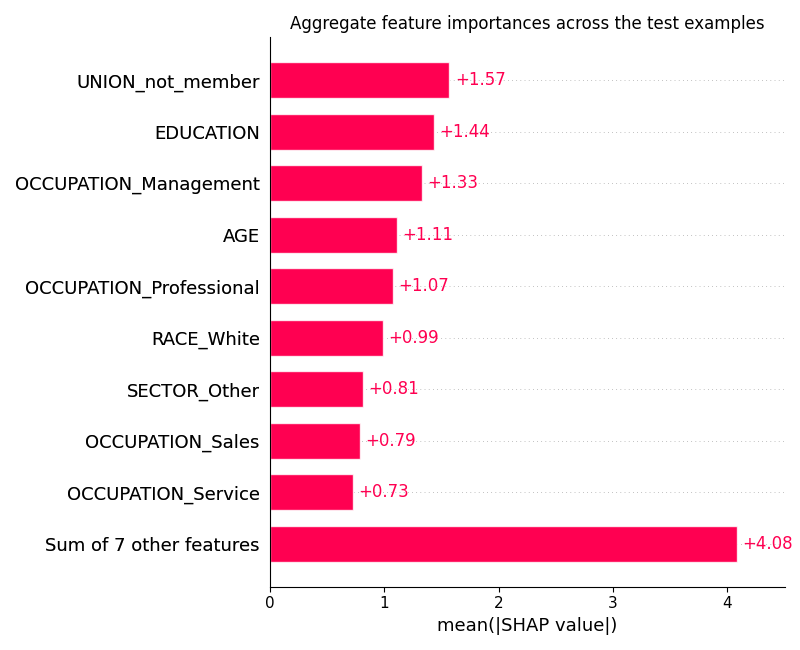
Bar plot of mean absolute SHAP values, showing aggregate feature importances
plot_shap(sv, kind="bar")
Beeswarm plot showing per-sample SHAP values for each feature
plot_shap(sv, kind="beeswarm")
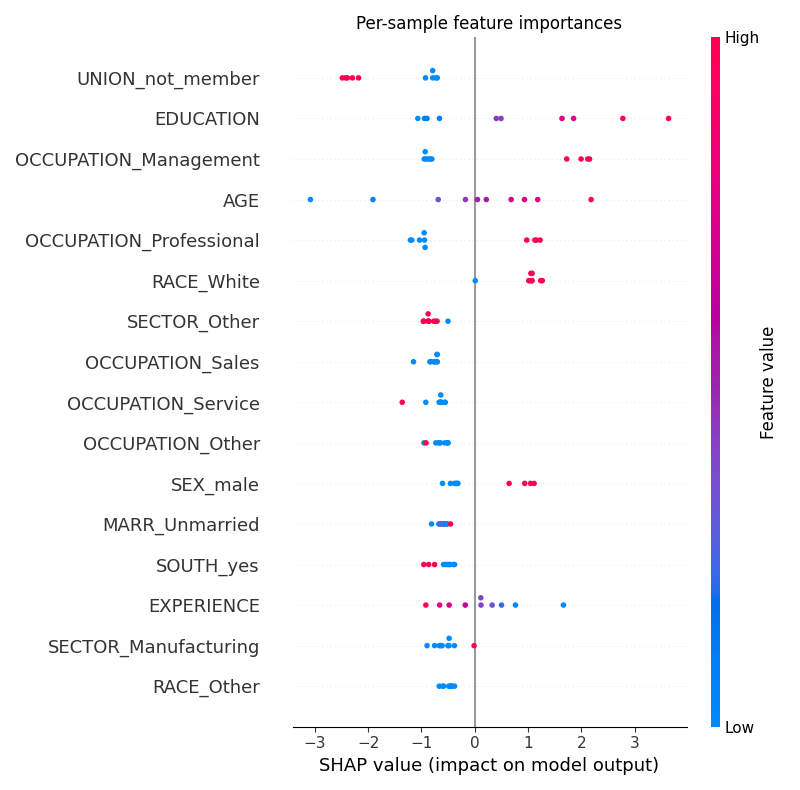
Note that these are approximate SHAP values, and not exact ones.
Total running time of the script: (8 minutes 26.104 seconds)